Legals
Legals is where the loyalty club's Terms of Use and GDPR / privacy document URLs live, and where the post-POS-registration consent flow is configured. The terms / GDPR URLs are displayed on the Registration form when members click "view terms" — keep them up to date when your legal team updates the documents. The consent settings card is set at launch and rarely changes.
URLs — Terms of Use and GDPR
Two URL fields:
- Terms of use — the URL of your hosted Terms-of-Use document. Whatever lives at this URL is what members see when they click the terms link on the Registration form.
- GDPR — the URL of your hosted GDPR / privacy-policy document. Same idea.
These are typically pages on your business website (e.g. https://yourbusiness.com/terms and https://yourbusiness.com/privacy). Whenever your legal team updates the documents, no work is needed here — the URL keeps pointing at the same page, the new content shows automatically. Update the URLs only if you move the documents to a new path.
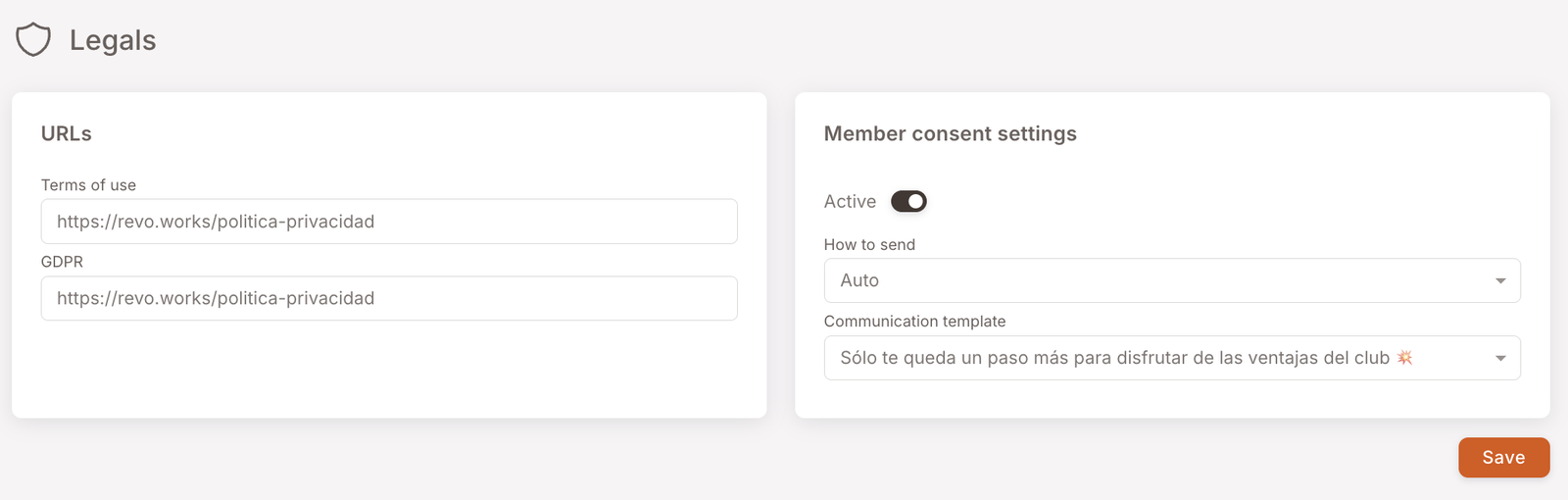
Member consent settings
The right-hand card on the page controls the completion flow — the message that chases members who were registered without their mandatory fields.
This happens whenever a member is created from outside the public form: the cashier signs someone up at the till with just a phone number, or a POS registration item creates the member on a purchase. In both cases the member exists but has consented to nothing. The full picture of the routes into the club is on How members join.
- Active — toggle. When on, members registered without their mandatory fields are chased automatically. Off means they stay incomplete indefinitely.
- How to send — the channel used: SMS or email. SMS is the usual choice, since a phone number is often the only handle you have.
- Communication template — the message that gets sent, picked from your Comm. Templates library. It must contain the consent request link, inserted from Select magic links in the template editor — that link is what carries the member to the Registration form.
In effect: registered with a phone number only → receives this message → taps the link → completes the mandatory fields → can log in to the loyalty web app. Until then, opening the web app redirects them back to the form.
When to touch this
- Update the Terms of Use or GDPR URLs if you move the documents to a new path.
- Change the consent SMS / email by editing the template under Comm. Templates — the template name selected here will pick up the new copy automatically (templates are referenced, not snapshotted).
- Disable the consent flow by toggling Active off — only do this if you've changed how POS-side registration works on the operational side.
Why keeping the URLs current matters
Members often skip the terms link on registration, but regulators don't — when a data-protection authority asks "what did members agree to?", the answer needs to be the document at the URL on file. If your legal team updates the document and the URL has moved, members are agreeing to a 404 page. Quick check after any legal-document update: does each URL still load the right document?