Rule: Punch card
Buy 8 coffees, get the 9th free — a punch-card playbook
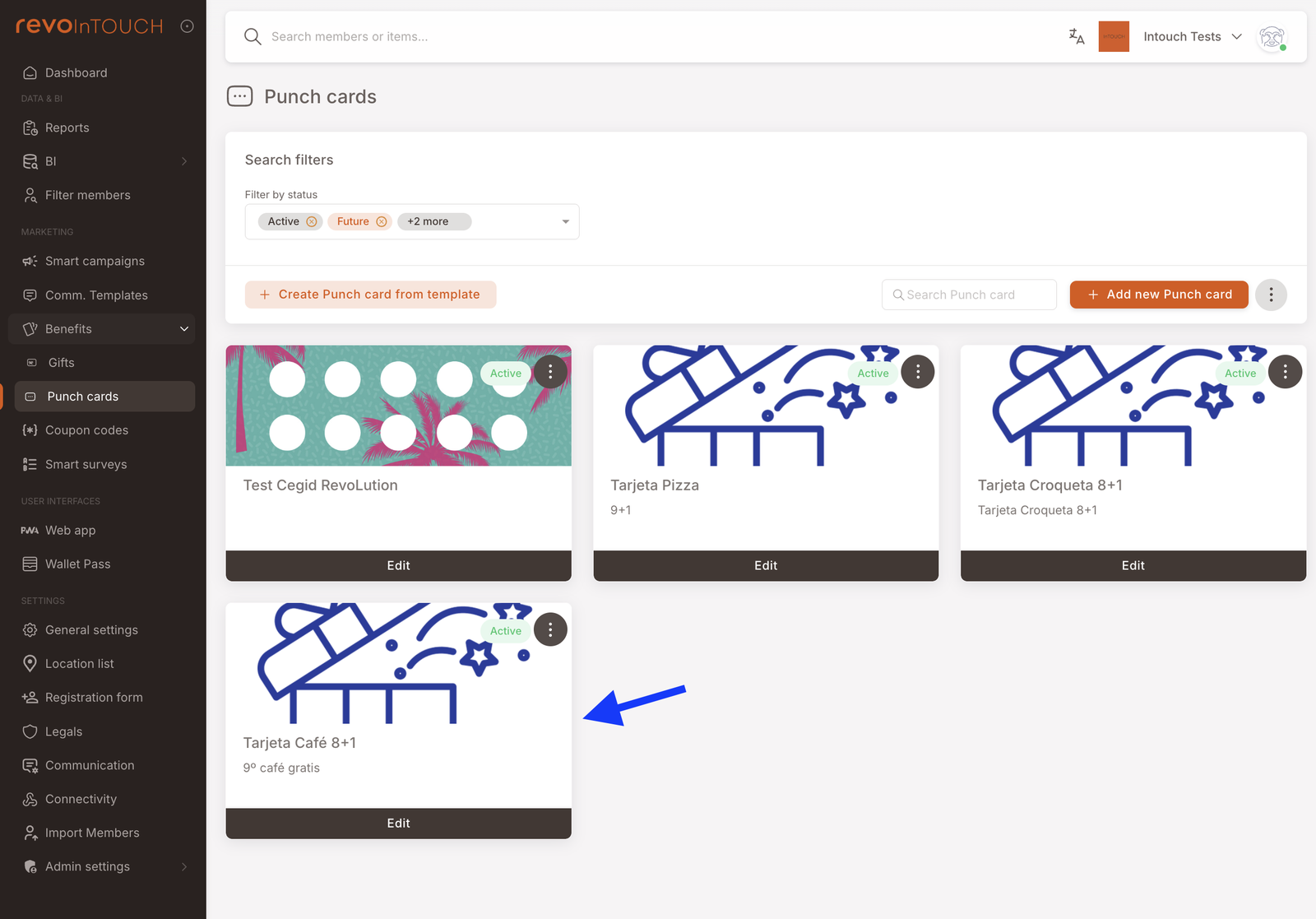
First, build the Punch card under Benefits → Punch cards (8 punches, free-coffee reward, artwork). Then build the Rule:
Step 1 — Pick Rule, name it 9th Coffee Free.
Step 2 — Two settings:
- Trigger: Makes a purchase.
- Condition: Basket item belongs to Coffees.
Step 3 — Punch a punch card → Asset: Tarjeta Café 8+1, Quantity: 1, For each: Coffees.
Step 4 — Save.
A punch lands on every qualifying coffee; on the 8th, the card completes and becomes the redeemable reward.
This playbook wires up the classic "buy 8, get 1 free" flow. It's a two-part setup — and the order matters:
- Create the Punch card first under Benefits → Punch cards (visuals, number of punches required, the reward the member receives when the card fills).
- Then create the Rule that adds a punch to the card on every qualifying purchase.
The Punch card itself is the reward — a completed card lives in the member's wallet and is redeemed at the register like any other Gift.
What you'll build
The end-to-end flow, from the member's point of view:
- Member buys a coffee → their Punch card gains one punch. If they didn't have a card yet, one is auto-issued with the first punch already applied.
- Member keeps buying coffees → punches accumulate.
- On the 8th qualifying coffee the card fills. The completed card is itself the redeemable reward — it sits in the member's wallet like any other Gift, and a fresh empty card is auto-issued for next time.
- Member redeems the completed card on their next visit for a free coffee.
Behind the scenes, this is one Punch card asset plus one Rule.
When to use this
Use this pattern when you want a visible, gamified cadence reward — members can see their progress toward the free coffee, which drives repeat visits in a way that silent cashback accumulation doesn't. The classic fits are coffee shops, lunch spots, car washes, and any subscription-adjacent service where the unit of consumption is countable and repeat.
Before you start
2 prerequisites — Punch card asset + qualifying item group
- The Punch card asset you want to punch already exists. Punch cards are configured under Benefits → Punch cards: total punches required, what the card redeems for, redemption window, card artwork. The Rule only references the card — it doesn't create one. Build the card first, then come back here.
- You know the item group that counts as a qualifying unit. The For each field on the punch action takes a product category or an item group — Coffees, Teas, Drinks. One qualifying unit in the basket contributes one punch (more if Quantity is above 1). If you haven't set up the item group in your POS / catalogue yet, do that first.
Walkthrough
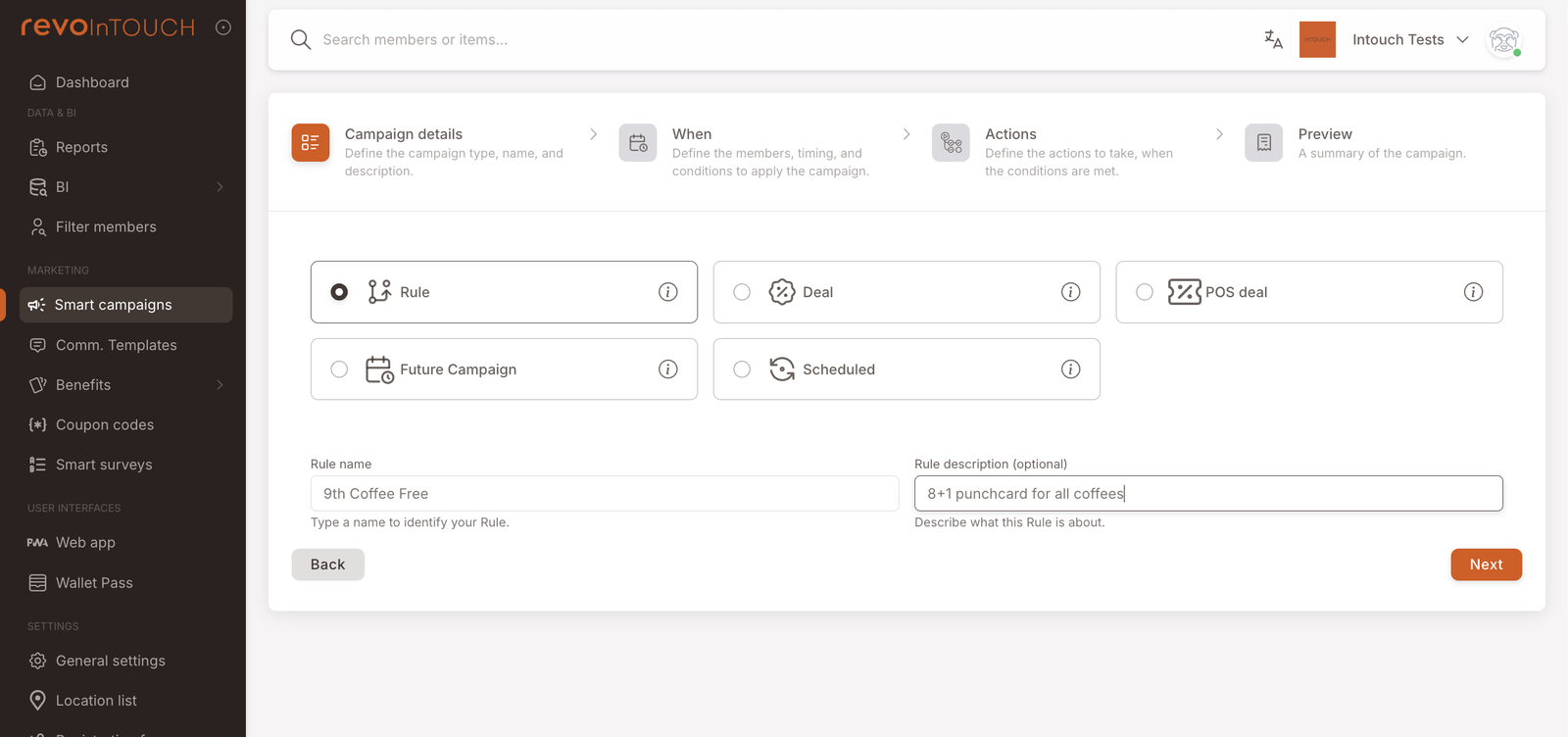
Step 1 — Campaign details
Pick Rule as the kind. Name it so the card's occasion is obvious — 9th Coffee Free works. In the description, park the why (e.g. "8+1 punchcard for all coffees").
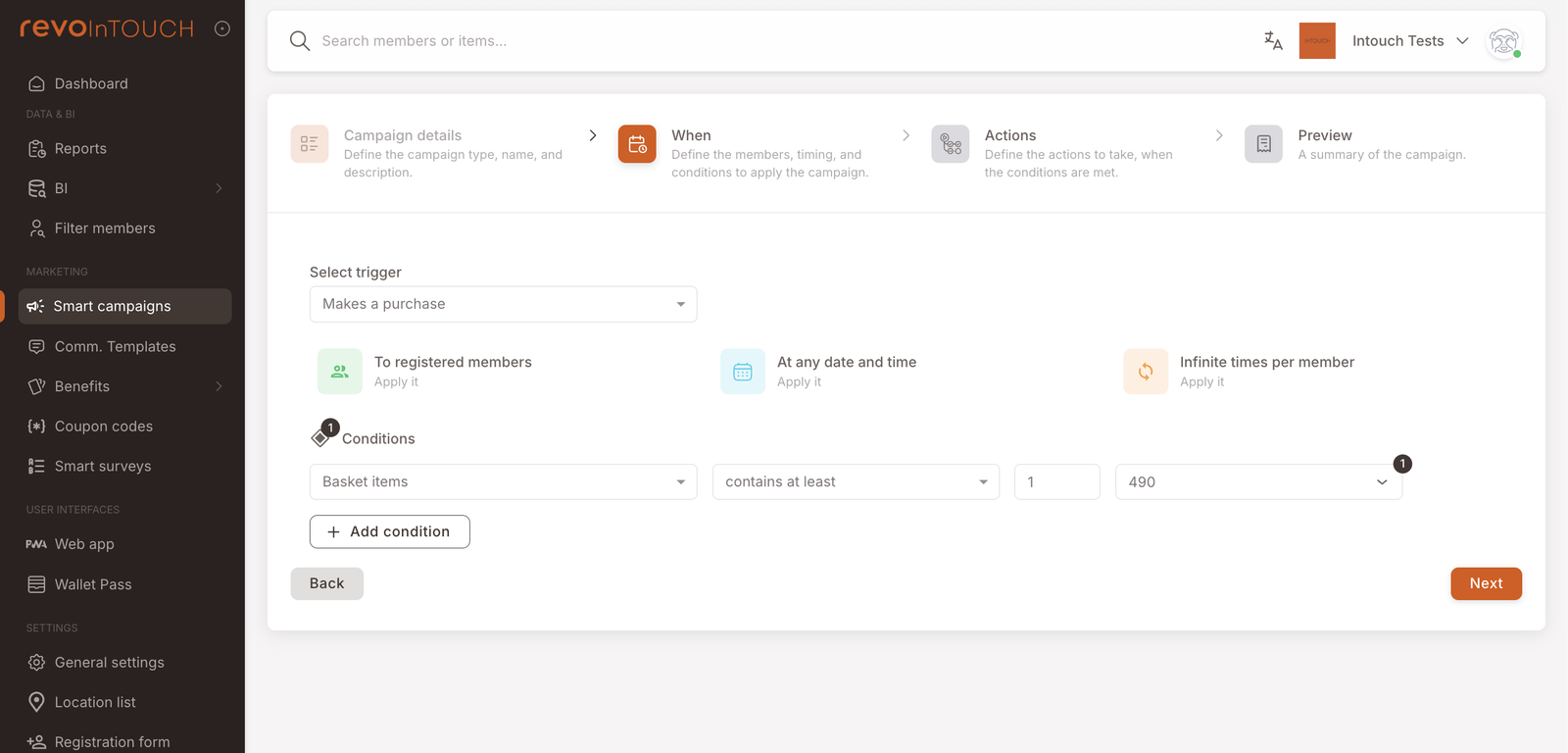
Step 2 — When
Set the trigger to Makes a purchase. Leave the three default tiles as they are — To registered members, At any date and time, Infinite times per member.
Add one Condition on the triggering event filtering on the item group that counts as a qualifying unit — e.g. Basket item belongs to Coffees (or whichever product category your tenant uses).
Step 3 — Actions
One action, stacked in the default "Do …" layout.
- Select Punch a punch card from the action dropdown.
- Asset — pick the Punch card you prepared under Benefits (Free coffee card).
- Quantity — 1 punch per qualifying unit is the standard setup. Set higher if you want to accelerate accumulation (e.g. a promotional weekend where every coffee counts as two punches).
- For each — Coffees (the item group you conditioned on in step 2). Each qualifying unit in the basket contributes Quantity punches, so a basket with three coffees adds three punches at the default setting.
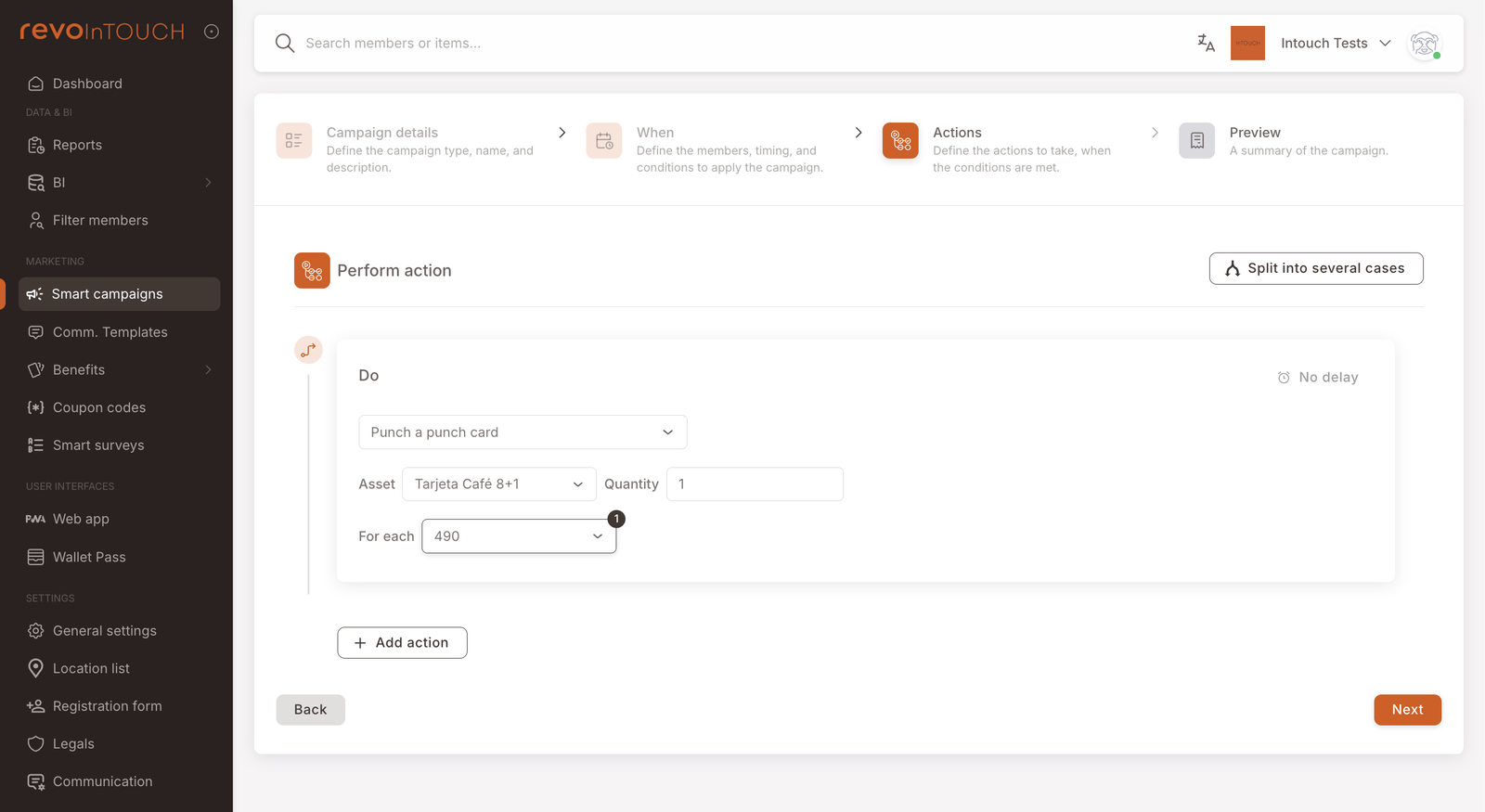
You do not need a separate Send asset action to give the member the empty card first. If the member's first qualifying purchase is the one that triggers this Rule, Punch a punch card automatically issues an empty card and applies the first punch in one go.
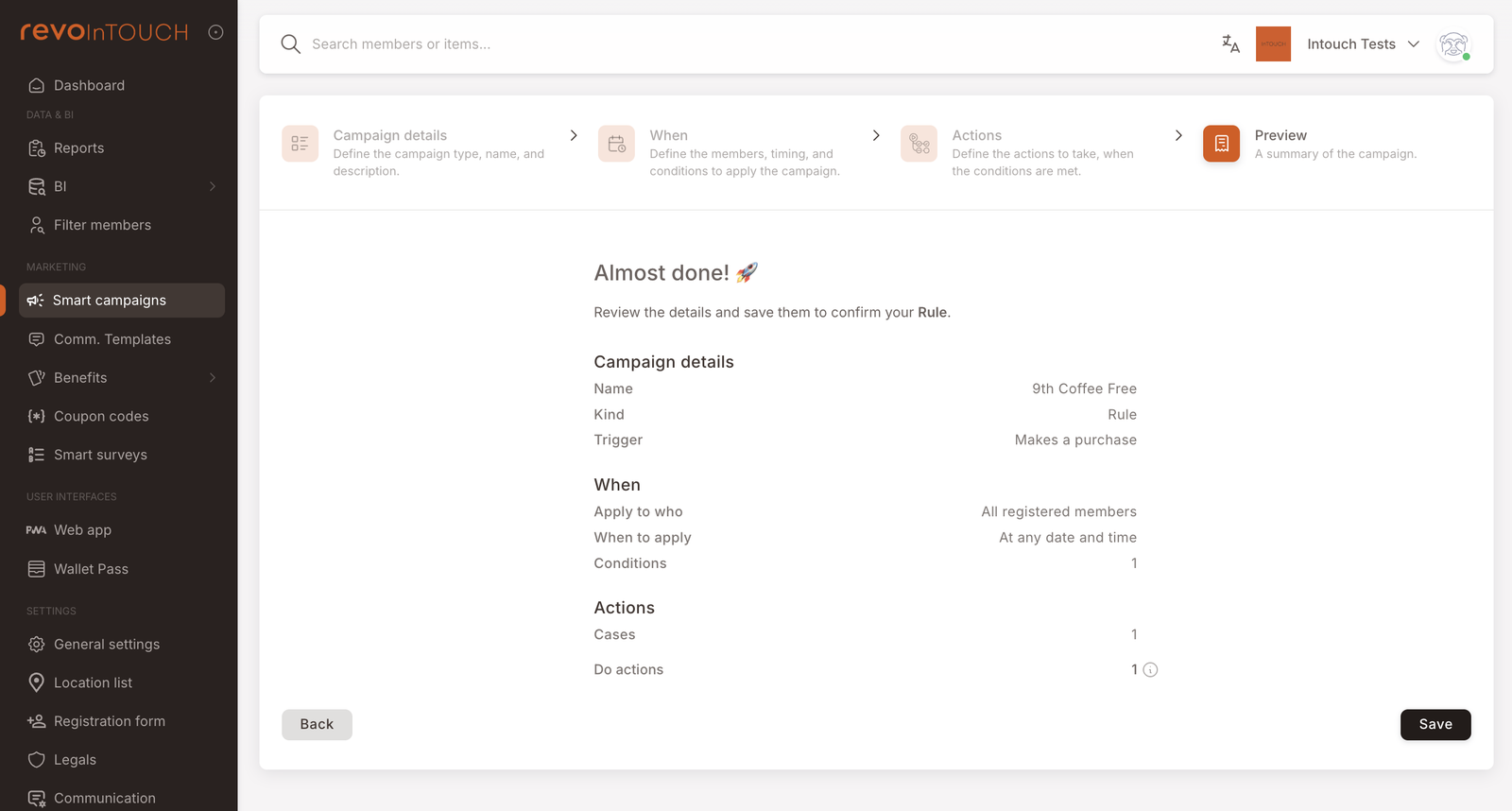
Step 4 — Preview
Read the recap and confirm:
- Kind shows Rule (not Scheduled or Future Campaign).
- When shows Makes a purchase with 1 condition.
- Actions shows Cases: 1 and Do actions: 1.
Click Save. The Rule starts life as Active — punches will begin applying to the next qualifying purchase that matches the condition.
How to test it
4-step pattern using a test-user tag and repeated qualifying purchases
Use the same test-user tag pattern as the other playbooks:
- Tag yourself (or a teammate) with
test-userfrom the member's profile page. - Open the Rule's Audience tile on step 2 and restrict it to members with the
test-usertag. The tag goes on the audience tile, not in the Conditions section: conditions filter the purchase, the audience filters the member. - Run qualifying purchases under the tagged member at the POS. After each purchase, the member's active card should show one more punch. On the final qualifying purchase, the card should complete in the member's wallet — the full card is itself the redeemable reward.
- When the test passes, widen the Audience back to the real population and save.
Variations
4 common tweaks — weighted items, sign-up card, time-limited promo, double-punch promo
Weight different products differently — some items earn more punches than others. Stack two Punch a punch card actions on the Rule, both pointing at the same card but with different Quantity and For each settings. For example, to count coffees double and teas single: one action with Quantity 2, For each Coffees and a second with Quantity 1, For each Teas. A basket with two coffees and a tea now adds 5 punches (2×2 + 1×1).
Issue the empty card up-front at sign-up. If you want members to see the empty card in their wallet the moment they register (even before their first coffee), add a separate Rule on Joins the program with a Send asset action pointing at the same Punch card template. The first purchase will still punch the existing card rather than issue a new one.
Time-limit the promotion. The Punch card template carries its own validity window. Give it a 60-day life if you want the promotion to expire — members who don't fill their card in time lose the in-progress punches. (If you'd rather keep punches alive indefinitely, leave the window open-ended.)
Promo mode: double punches on a date range. Set the Quantity on the Rule to 2 rather than 1 for the duration of a promotion. Swap back to 1 when the promo ends. No second Rule needed — the punch action is configurable in place.
Gotchas
3 things to watch for
- The card's reward isn't configured on the Rule. What the member gets when the card fills (free coffee, %-off coupon, free merch) is baked into the Punch card template under Benefits, not into the Rule. If you want to change the reward, edit the card — not the Rule.
- Discounted coffees might not punch. This Rule punches once per qualifying unit — but whether a discounted coffee counts as a qualifying unit is decided by a separate club-wide setting, Stamp strategy. On the default (Paid whole units), a single coffee sold at 10% off earns no punch at all. If members report missing punches after a promotion, check that setting before debugging the Rule.
- Overflow is handled silently. If one purchase would push the member past the card's final punch (3 punches left, member buys 5 coffees), the current card completes, a fresh empty card is auto-issued, and the remaining 2 punches carry to the new card. No punches are wasted, and no special Rule configuration is needed — but the member will get two cards in their wallet after that single purchase, which can be surprising if they don't expect it.