Summarize with AI
Punch
In short
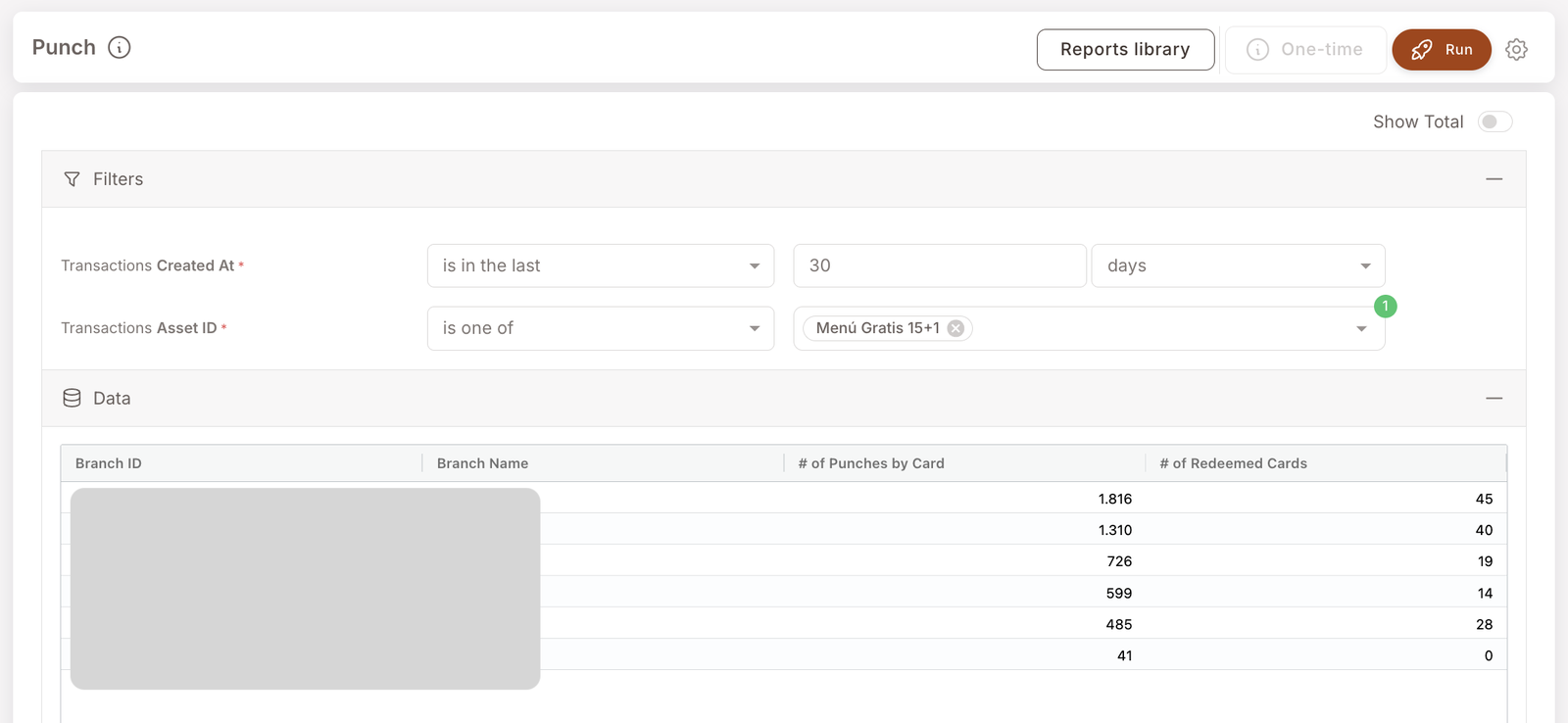
Branch-level punch-card activity for a chosen card. For each branch, you'll see how many punches were earned and how many cards were redeemed in the period. Reach for it when you want to know which branches are driving punch-card engagement and where redemptions are concentrating.
note
Screenshots on this page show one merchant's setup (Spanish labels). Your Hub displays the labels and content you configure for your own program.
This is the "branch view" of punch-card activity — different from Punch count, which is the per-member view. Both report on the same underlying activity; pick the one that matches your question's level of aggregation.
What you'll see
Required filters:
- Transactions Created At — date range (typically is in the last 30 days).
- Transactions Asset ID — is one of [punch card name(s)]. You're scoping the report to a specific Punch card asset (e.g. Menú Gratis 15+1).
Data columns (per branch):
- Branch ID / Branch Name — the branch.
- # of Punches by Card — total punches earned at this branch in the period (summed across all members holding the card).
- # of Redeemed Cards — count of completed cards redeemed at this branch.
When to reach for this report
4 common use cases
- Branch performance comparison. Which branches are driving the most punches and the most redemptions? Often closely correlated; sometimes not (a branch may rack up punches but the holders redeem elsewhere — worth understanding).
- Validate a punch card is firing correctly. A new punch card should show non-zero rows here a few days after launch. Zero rows means the Rule that punches it isn't matching real baskets.
- Redemption-velocity check. A high # of Punches with low # of Redeemed Cards suggests members are accumulating but not finishing. Could be (a) the card is too long (16+ punches required is too much for most cadences), (b) members aren't aware of their progress, (c) the reward isn't compelling.
- Branch-level attribution for a multi-location promotion. If a punch-card promotion is running across all locations, this report shows where it's pulling weight.
What to do with the result
Follow-on actions
- Tune the punch card if redemption velocity is low. Edit the punch card asset under Benefits → Punch cards to adjust Total punches, the redemption window, or the reward shape.
- Re-engagement push for stale-card holders. Members with partially-filled cards who haven't punched recently are good targets. Use Filter members to find them — Filter members can narrow by held assets, so a filter like Did not made a purchase in the last 30 days + holds Tarjeta Café 8+1 gives you exactly that segment. Push a one-time SMS reminder via the + One-time action button.
- Branch coaching. Branches that under-index on punches relative to their visit volume might have cashier-flow issues at identification time.
Related reports
- Punch count — the per-member view of the same activity. Punch is by branch; Punch count is by member.
- Visits — branch-level visit volume; pair with this report to see what % of visits are earning punches.
- Gift Performance Report — the Gift-asset analogue (different asset type, similar campaign-impact question).